Prime number program in c using if else

Prime number program in c using if else

 Prime number program in c using if else:
#include <stdio.h>
int main()
{
    int i, j, flag = 0;
    printf("Enter the Number: ");
    scanf("%d", &i);
    for(j = 2; j <= i/2; ++j)
    {
        if(i%j == 0)
        {
            flag = 1;
            break;
        }
    }
    if (i == 1)
    {
      printf("1 is neither a prime nor a composite number.");
    }
    else
    {
        if (flag == 0)
          printf("%d is a prime number.", i);
        else
          printf("%d is not a prime number.", i);
    }
    return 0;

}
Output:
Enter a number: 4

4 is a not Prime Number.
See also: Prime number program in c
Share:

Prime number program in c using do-while loop

Prime number program in c using do-while loop

 Prime number program in c using do-while loop:
#include<stdio.h>
int main()
{
    int i,j,k;
    printf("Enter a number: ");
    scanf("%d",&i);
    k=0;
    j=2;
    do
    {
        if(i%j == 0)
        {
            k=1;
            break;
        }
        j++;
    }
    while(j <= i/2);
    if(k==0)
        printf("The entered number is Prime Number");
    else
        printf("Entered number is Not Prime Number");
    return 0;

}
Output:
Enter a number: 7

The entered number is Prime Number.
See also: Factorial Program in Java
Share:

Factorial Program in Java with examples.

Factorial Program in Java and Examples


Factorial:  Factorials are products of every whole number from 1 to n Factorials are introduced in algebra. The value of 0! is 1, according to the convention for an empty product. The notation n! was introduced by the French mathematician Christian Kramp in 1808.

Formula:

n! = n(n-1)(n-2)(n-3)(2)(1)

 (or)

n! = n.(n-1)!.

Example:

4! =  4*(4-1)*(4-2)*(4-3)*(4-4)
4! =  4*3*2*1
4! = 24

Factorial Program in Java:

Factorial Program:
class Fact
{
 public static void main(String args[])
 {
  int fact = 1,j = 6;
  for(int i = 1;i<=j;i++)
  {
   fact = fact * i ;
  }
 System.out.println("Fact of 6 = "+fact);
 }
}
Output:
Fact of 6 = 720

Factorial program in Java using user entered value:

Java Factorial program:
import java.util.Scanner;
class Fact1
{               
 public static void main(String args[])
 {
  Scanner s = new Scanner(System.in); 
  int fact = 1;
  System.out.print("Enter the value of j = ");
  int j = s.nextInt();
  for(int i = 1;i<=j;i++)
  {
   fact = fact * i ;
  }
 System.out.println("Fact of " + j + " = " +fact);
 }
}
Output:
Enter the value of j = 10
Fact of 10 = 3628800

Factorial program in Java using recursion:

Java Factorial recursion program:
class FactorialRecursion
  int factorial(int n)
 {   
  if (n == 0)   
    return 1;   
  else   
    return(n * factorial(n-1));   
 }             
 public static void main(String args[])
 { 
  int i,fact = 1; 
  FactorialRecursion f1 = new FactorialRecursion();
  fact = f1.factorial(5);  
  System.out.println("Factorial of 5 = "+fact);   
 } 
Output:
Factorial of 5 = 120

Factorial program in Java:

Recursion program using user entered value:

Java Recursion Factorial program using user entered value:
import java.util.Scanner;
class FactorialRecursion1
  int factorial(int n)
 {   
  if (n == 0)   
    return 1;   
  else   
    return(n * factorial(n-1));   
 }   
 public static void main(String args[])
 { 
  int i,fact = 1; 
  Scanner s = new Scanner(System.in);
  FactorialRecursion1 f1 = new FactorialRecursion1();
  System.out.print("Enter the value of J = ");
  int j = s.nextInt();
  fact = f1.factorial(j);  
  System.out.println("Factorial of J = "+fact);   
 } 
Output:
Enter the value of J = 6
Factorial of J = 720
See also: Prime Number Program in C using For loop
Share:

Prime Number Program in C using For loop

Prime Number Program in C using For loop

Prime number program to print from 1 to 100.

C program to print numbers from 1 to 100:
#include<stdio.h>
int main()
{
  int limit = 100;
    printf("Prime numbers between 1 and 100 are: ");
    for(int i = 2; i < limit; i++)
    { 
     int flag = 0;
     for(int j=2;j < i;j++)
      {
             if(i%j==0)
              {
                 flag = 1;
                 break;
             }
        }
         if(flag ==0)
             printf("%d ",i);
    }
   return 0;
}
Output:
Prime numbers between 1 and 100 are: 2, 3, 5, 7, 11, 13, 17, 19, 23, 29, 31, 37, 41, 43, 47, 53, 59, 61, 67, 71, 73, 79, 83, 89, 97.

Explanation of the above program: 

  1. If the For loop condition (i <= limit) is true then loop enters into for loop and check the if condition (i%j == 0). 
  2. If the condition is true the Entered number is not the prime number.
  3.  If the condition is False, then the Prime number is printed up to the given limit. When for loop condition (101 <=100) then the program terminates.

Prime Number Program in C using For loop

Prime number program to print from 1 to N.

C program to print numbers from 1 to N:
#include<stdio.h>
int main(){
  int i,j,count,k;
    printf("Enter max range: ");
    scanf("%d",&k);
    for(i = 1;i<=k;i++)
     {
         count = 0;
         for(j=2;j<=i/2;j++){
             if(i%j==0){
                 count++;
                 break;
             }
        }
         if(count==0 && i!= 1)
             printf("%d ",i);
    }
   return 0;

}
Output:
Enter max range: 70

2, 3, 5, 7, 11, 13, 17, 19, 23, 29, 31, 37, 41, 43, 47, 53, 59, 61, 67.

Explanation of the above program: 

  1. First, the user should give the range value from the keyboard. the value is stored in the variable "k". 
  2. If the For loop condition (i <= limit) is true then loop enters into for loop and check the if condition (i%j == 0). 
  3. If the condition is true the Entered number is not the prime number.
  4.  If the condition is False, then the Prime number is printed up to the given limit. When for loop condition (101 <=100) then the program terminates.

Share:

Java If Else with Examples and Programs

Java if statement: The if statement is decision-making statement and is used to control the flow of executions of statements. It is the two-way decision statement and is used in conjunction with a Test expression.


Declaration of if statement:
if(test expression)

Explanation: In the above declaration the if statement allows the computer to evaluate the expression first and then depending on whether the value of the expression (means condition) is “True” or “False” it transfers the control to next statement. The program has to follow two paths one for the true condition another for the false condition.

SIMPLE IF STATEMENT
If (test expression)
          {
            statement-block;
           }
           statement-n;

The statement block may be a single statement or a group of statements. If the test expression is true, the statement block will be executed otherwise the statement-block will be skipped and the execution will jump to the statement-n;
Java If Else program Example using Integers:

class IfExample
 {
  public static void main(String[] args)
  {
    int i = 6, j = 7;
    if(i<j)
    {
 System.out.println("J is Greater then I");
    }
  }
}

Output: 
J is Greater then I

Example 2:
class IfExample1
{
public static void main(String[] args)
{
 if(8>6)
 {
 System.out.println(" Welcome to TutorialsWeb ");
 }
}
}

Output:
Welcome to TutorialsWeb

else: It is a keyword using this keyword we can create the alternate block for “if” condition using “else” means always optional, it is recommended to use. When we have an alternate block of “if” condition. When we are working with “if” and “else” only one block will be executed and when the if a condition is false then only the else part will be executed.

if …else Statement:
The if …else statement is an extension of the simple if statement. The Syntax of if …else statement is below:


if(test expression)
{
 True-block statement(s);
}
else
{
 False-block statement(s);
}
statement(x);

Explanation: If the Test expression is true, then the true-block statement(s), immediately following the if statements are executed. Or the False-block Statements are executed. In another case, either true-block (or) False-block will be executed, not both. Then the control is transferred subsequently to the statement-x;

Java If Else program:
import java.util. *;
class IfElseExample
{
public static void main(String[] args)
{
 Scanner s1 = new Scanner(System.in);
 System.out.println("Enter I value");
 int i = s1.nextInt();
 System.out.println("Enter J value");
 int j = s1.nextInt();
 if(i > j)
 {
 System.out.println("I is Greater then J");
 }
 else
 {
 System.out.println("J is Greater then I");
 }
System.out.println("Out Of If Else Loop");
}
}

Output:
Enter I value
15
Enter J value
14
I is Greater then J
Out Of If Else Loop

Explanation:
1)    Two integers “I” and “J” are declared. Input values are received for both “I” and “J” using Scanner.
2)     In the above program if else condition statement is used to check whether “I” is greater than “J”.
3)    If “I” is greater than “J”, the Print message “I is Greater then J” is Printed.
4)    If “J” is greater than “I”, the else part will be executed. The Print message “J is Greater then I” is Printed.
5)    After completing the else part the statement-x will be executed.

Nested If…else Statements in Java: When a series of decision is involved then we have to use more than one if…else statements in the nested form shown below.

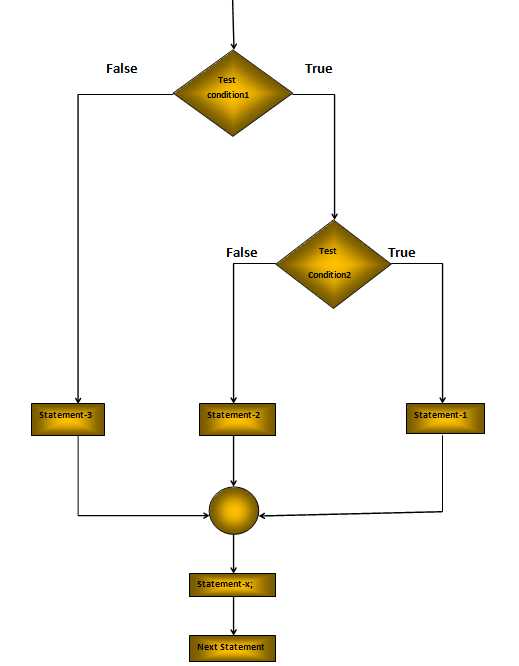
Explanation: In the above logic of execution if the Test condition-1 is True, it continues to the Test condition-2. If the Test condition-2 is True, the statement-1 will be evaluated other-wise else statement-2 evaluated. If the condition-1 is false, the statement-3 will be executed, and then the control is transferred to the statement-x;


Program:                                                         
import java.util.*;
class NestedIfelseExample
{
 public static void main(String[] args)
 {
 Scanner s1 = new Scanner(System.in);
 System.out.println("Enter the Number");
 int n = s1.nextInt();
 if(n > 0)
 {
 if(n == 0)
 {
  System.out.println("It is Zero");
 }
 else
 {
 System.out.println("Number is greater than Zero");
 }
 }
 else
 {
 System.out.println("Number is less than Zero");
 }
 }
}

Output:
Enter the Number
12
Number is greater than Zero


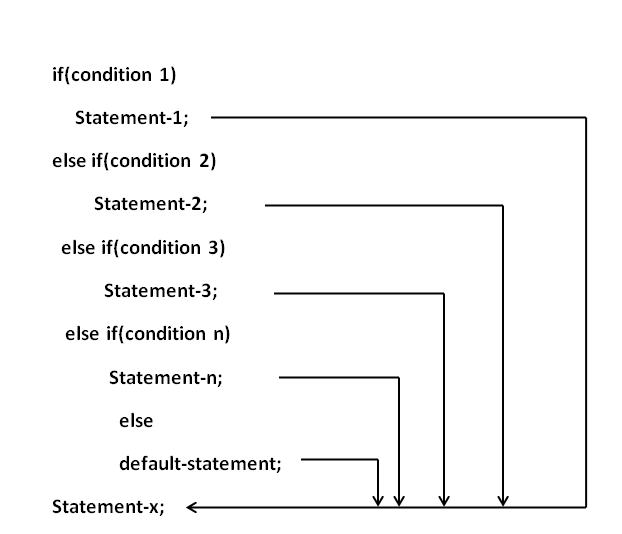
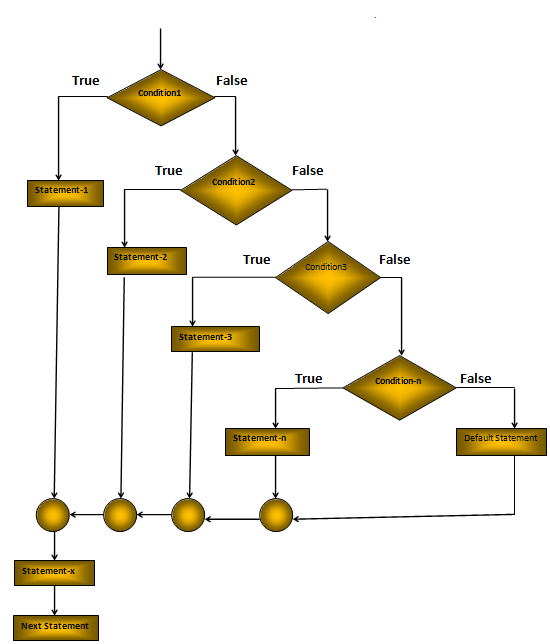
The Else If Ladder: Another way of putting ifs together when multipath decisions are involved. A multipath decision of ifs in which the statement associated with each else is an if.  The syntax of Else If Ladder is shown below:
Explanation: In the above Else If Ladder the conditions are evaluated from the top of the ladder to downwards. When the condition found to be True, the statement associated with it is executed and the control is transferred to the statement-x skipping the rest of the ladder. When all the n conditions become False, then the final else with default statement will be executed.

Program:

import java.util.*;
class ElseIfLadderExample
{
 public static void main(String[] args)
 {
 Scanner s1 = new Scanner(System.in);
 System.out.println("Enter the Marks");
 int m = s1.nextInt();
 if(m<50)
    { 
     System.out.println("fail"); 
    } 
    else if(m >= 50 && m < 60)
    { 
     System.out.println("D grade"); 
    } 
    else if(m >= 60 && m < 70)
    { 
     System.out.println("C grade"); 
    } 
    else if(m >=70 && m < 80)
    { 
     System.out.println("B grade"); 
    } 
    else if(m >= 80 && m < 90)
    { 
     System.out.println("A grade"); 
    }
    else if(m >=90 && m < 100)
    { 
     System.out.println("A+ grade");  
    }
    else
    { 
     System.out.println("Invalid!"); 
    } 
  }
}

Output:
Enter the Marks
66
C grade
Share:

Ads

Search This Blog

  • ()
Powered by Blogger.

Strings in C With Syntax, C String Program with output

Strings in C :  Strings can be defined as the one-dimensional array of characters terminated by a null ('\0'). The difference betwee...